Skip to content

Changelog

What's new on Layer

Product updates, new models, improvements, and fixes — shipped continuously.

GPT Image 2 is now live on Layer

🏁 Gaming creative workflows just got an upgrade today with the addition of newer model GPT 2.0 by Open AI to top charts!

  • Enhanced multilingual rendering, supporting Japanese, Korean, Chinese, Turkish, Finnish, Spanish allowing text to be integrated into the design seamlessly

  • Good for localization & culturalization of assets in batches 🏆 Sharper instruction following, with improved handling of UI elements, small text and dense compositions at resolutions up to 2K

  • Good for Game UI Design: Flexible aspect ratios ranging from 3:1 to 1:3

  • Good for banners, posters, card albums, mobile screens in one go

New models4

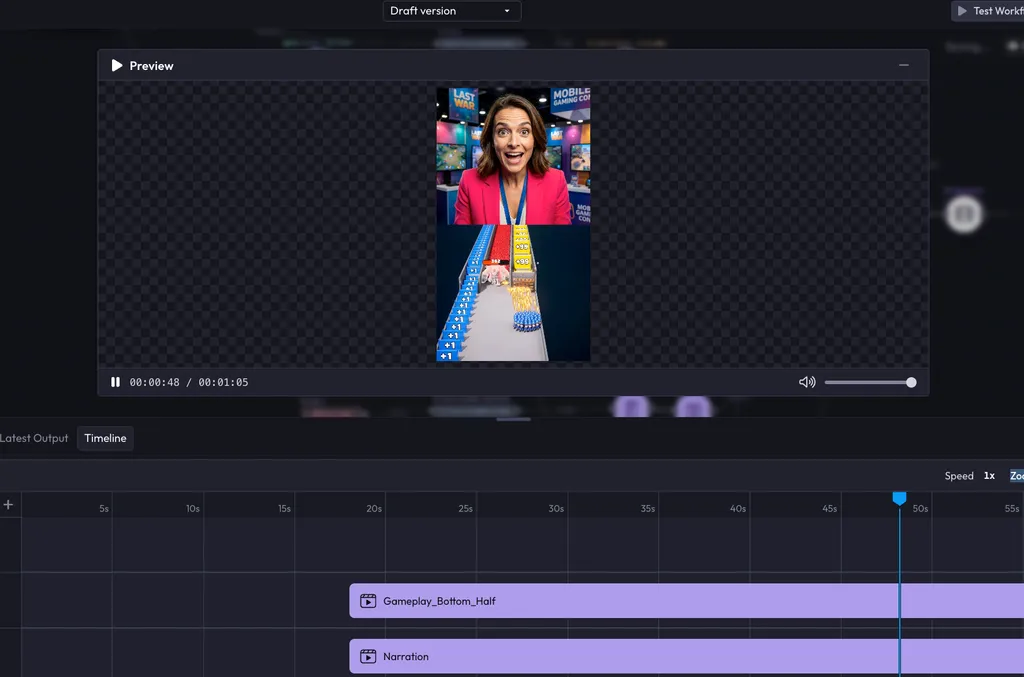
Video Timeline Editor, captions & GIF/PNG sequence exports

Video Timeline Editor, captions & GIF/PNG sequence exports (1 of 4)

What's new?

  • PNG sequence export: Videos can now be exported as individual PNG frames at 1 to 50 fps, making it straightforward to hand off frame-accurate assets to compositing or animation pipelines.

  • GIF export with frame rate control: Videos can now be exported as GIF files with configurable frame rates from 5 to 50 fps, directly from the export dialog.

  • Video export in MP4, WebM, and MOV: Videos can now be exported from Layer in multiple formats with codec selection (H.264, H.265, VP9), compression controls, FPS override, and metadata embedding, so deliverables are production-ready without additional transcoding.

  • Video timeline node fully implemented: The video timeline has been rebuilt as a complete Workflows node with new state management, a sidebar form for controls, and proper slot management, making it stable and composable within automated workflows.

Video Timeline Editor, captions & GIF/PNG sequence exports (3 of 4)

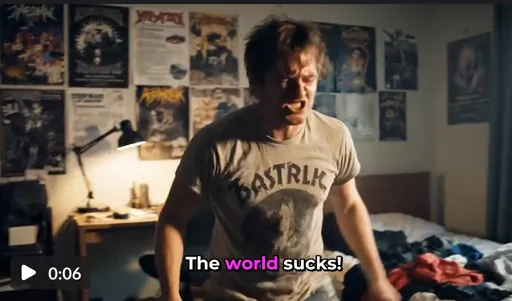
  • Captions in Video Timeline node: Layer now fully supports captions natively.

Video Timeline Editor, captions & GIF/PNG sequence exports (4 of 4)

  • Text renderer node: A new workflow node for rendering text is now available, enabling text generation to be wired into workflow pipelines on both the frontend and backend.

  • AI Image reframe in workflows: Image reframing is now available as a workflow node, allowing you to intelligently resize and reposition images as part of automated pipelines.

  • Prompt node to template conversion: Existing prompt nodes and runtime inputs can now be converted into reusable prompt templates within workflows, making it easier to standardize and reuse prompts across workflows.

  • Audio tracks for workflow videos: Workflow's video generator node now supports uploading audio tracks for models that support it.

  • Prompt Template node now generally available: The Prompt Template workflow node is now available to all users with workflow access.

  • Group-based usage limits: Workspace admins can now create usage groups, assign members to custom Creative Unit quotas, and gate generation when limits are reached, making cost control across large teams more structured.

  • Workflows Test runs view: Workflow edit and detail pages now include a run history panel showing activity for all generated items, making debugging and output tracking significantly easier.

  • Public REST API: You can now integrate Layer programmatically using the new public REST API, with endpoints covering workspaces, models, workflows, inferences, and file uploads.

Latest models
  • GPT-Image-2: OpenAI's latest image model is now available in Layer, with support for native output up to 3840px, three quality tiers, stronger text rendering, and masked editing.

  • Grok Imagine 2K resolution: Grok Imagine Image and Grok Imagine Image Edit now support 2K resolution output in addition to the existing 1K option.

Bug fixes & improvements
  • Failed inferences hidden from Activity feed: Failed generations no longer appear in the Activity feed, preventing users from thinking they were charged for unsuccessful runs.

  • Session delete now instant: Deleting a session now reflects immediately without requiring a page refresh.

  • MCP error sanitization: Internal error details such as database names and Redis hosts no longer leak to API clients in MCP responses.

  • MCP rate limiting removed: Rate limiting on MCP workflow execution has been removed, allowing agents and integrations to run workflows in parallel without hitting artificial caps.

  • GraphQL security hardening: Unauthenticated GraphQL introspection and field suggestions have been disabled in production, and a comprehensive Content Security Policy plus four additional security headers have been added across the app.

  • HEIC/HEIF files blocked with clear error: Attempting to attach HEIC photos now shows a clear error message instead of silently failing.

New models2

Kling multi-shot prompts, Reframe node & AV processing nodes

What's new?

  • REST API & Documentation: Layer now has a public API to execute AI generations (image, video, 3D, audio) and estimate pricing programmatically as well as to execute, and monitor workflow runs. API Docs

  • Layer MCP & Documentation: You can now connect Layer to Claude and other MCP friendly applications. MCP Docs

  • AI prompt generation in Workflows (with usage-based pricing): Workflows now support AI-powered prompt generation using GPT-5.2, priced at 0.01 CU per generation (0.1 CU minimum). Price estimates are shown in the dialog before running, so you can review costs ahead of time.

Kling multi-shot prompts, Reframe node & AV processing nodes (1 of 3)

  • Multi-prompt support for Kling video models: You can now define up to 6 prompt segments with individual durations when generating video with Kling models, up to 15 seconds total. This gives you more precise narrative and motion control across a single video generation.

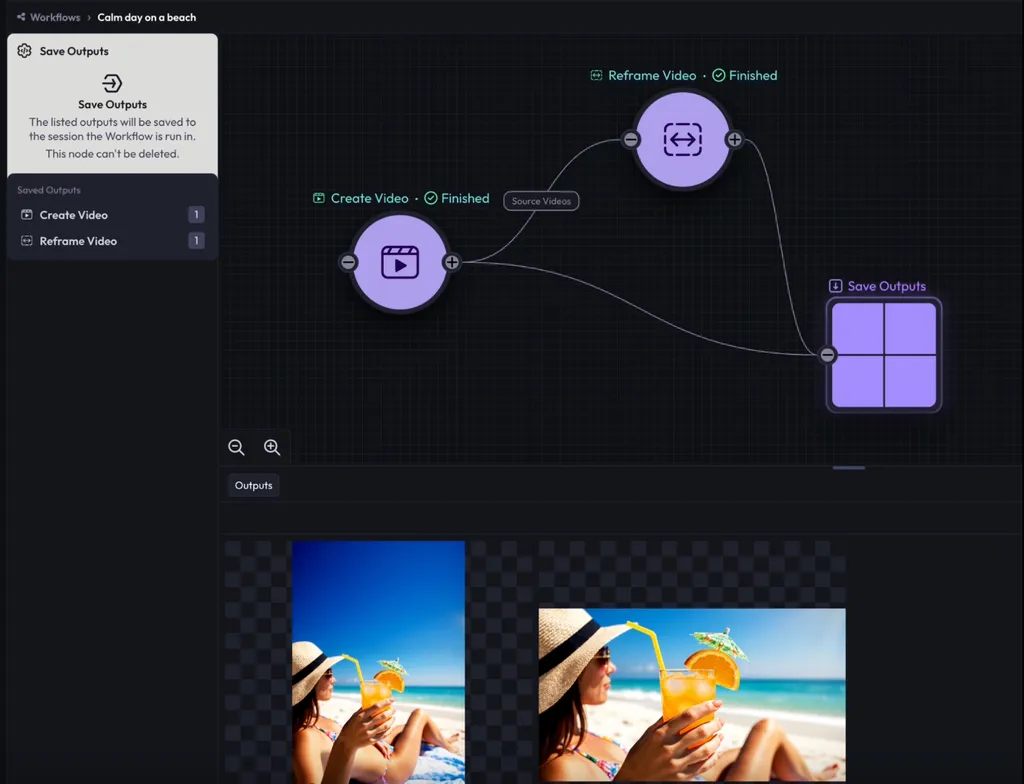
  • AI Reframe Video node in Workflows: Reframe Video node automatically reframes video content to a different aspect ratio, useful for adapting creative assets across formats without manual cropping.

Kling multi-shot prompts, Reframe node & AV processing nodes (2 of 3)

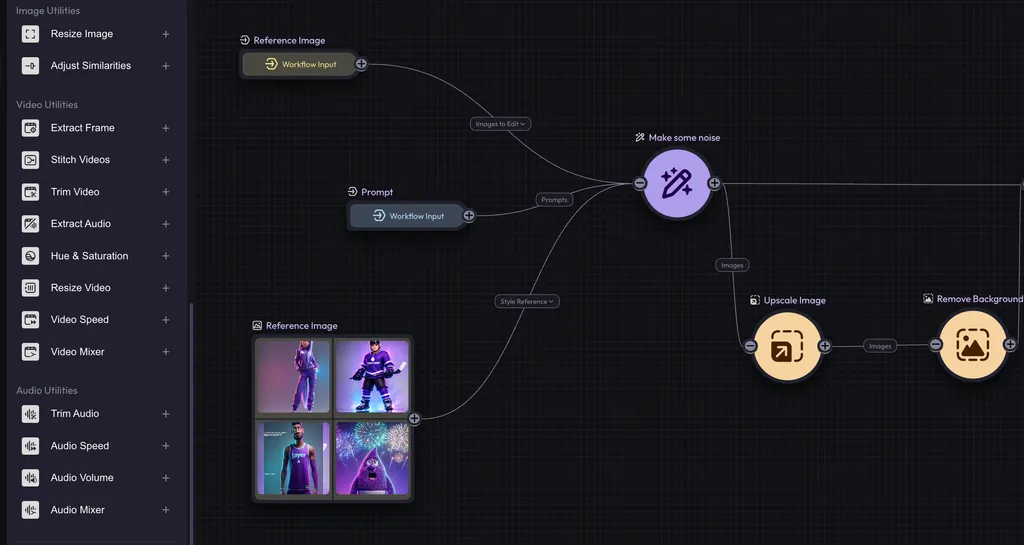
  • Audio and video processing nodes: Five new Blueprint nodes are now generally available: Audio Speed, Audio Volume, Audio Mixer, Video Speed, and Video Mixer, with advanced controls including fade-in/out and normalization. These complete the core audio/video processing toolkit in Blueprints.

Kling multi-shot prompts, Reframe node & AV processing nodes (3 of 3)

  • Workspace groups now support multiple child workspace assignments: Workspace groups can be assigned to multiple child workspaces at once, removing the previous requirement to duplicate groups when multiple teams need the same access configuration. Find out more info about Workspace Hierarchy management here

  • Video elements as guidance inputs: You can now use frontal images, reference images, and video references as guidance inputs in AI generation, giving you more control over how reference material influences output. We'll support this feature for all the models who support it

  • AI prompt generation in session view: You can now generate AI-powered prompts directly within a session, matching the functionality previously available only in the workflows editor.

  • Workflow share link re-access: The share dialog is now accessible again after a workflow has already been shared, so you can retrieve and copy the link at any time without resharing.

Bug fixes & improvements
  • Unwanted cropping in Prompt Edit fixed: Image cropping no longer occurs incorrectly in Prompt Edit when the selected model supports aspect ratio mismatches.

  • Mention data loss in templates fixed: User mentions in prompt templates are no longer deleted when editing surrounding text.

  • Workspace group database errors fixed: Resolved duplicate index exceptions that occurred when updating workspace groups with existing members or mirrored configurations.

  • Workspace selection now filters inaccessible workspaces: The default workspace selection no longer includes workspaces the current user does not have access to.

  • Video thumbnails restored in file picker: Video files now display thumbnails in the recent files section of the file picker.

  • Dimension preset snapping on style change: The dimensions field now snaps to the first available preset option when switching styles, preventing invalid states.

  • Three additional production crashes fixed: Resolved errors related to missing text modality support, style page crashes, and form state handling.

New models3

MCP support, new workflow nodes, and AI model recommendations

MCP support, new workflow nodes, and AI model recommendations

What's new?

  • Audio and video transformation nodes in Blueprints: Eight new utility nodes are now available in the workflows node-based editor: Trim Video, Trim Audio, Resize Video, Split Video & Audio, Hue & Saturation, Extract Frame (with timestamp support), and a Reference Audio node for attaching audio references to generation tasks. A further five nodes ship today adding Volume Control, Speed Adjustment, and Multi-track Mixing, rounding out the core audio/video processing toolkit.
  • Forge support in MCP App: The MCP interface now supports both workflow and forge generation modes, with auto-detection and real-time progress tracking. Previously limited to workflows, agents can now run forge generations and monitor their output directly from the MCP app UI. In order to access it, add https://mcp.app.layer.ai/mcp as a connector to your Claude.
  • Text node with runtime input support: A new Text node handles string and string list values with runtime input support and conversion to and from prompt format, enabling more flexible text handling within blueprint workflows.
  • Social media size presets: Instagram, Facebook, LinkedIn, and other platform-optimized size presets are now available in image composition workflows, removing the need to manually enter dimensions for common formats.
  • MCP now open to all authenticated users: MCP server access is no longer restricted to internal users and is available to all authenticated accounts.
  • Multi-workspace support & improvements: Layer now fully support parent/child workspace structure that lets studios manage Creative Unit (CU) budgets across multiple teams or sub-studios from a single place.
  • Prompt Template node in Workflows: A new Prompt Template node lets you create reusable prompt templates using @mention syntax, which converts to dynamic placeholders at runtime. Useful for teams standardizing prompt structures across multiple workflows. GA coming soon, ask for access!
  • New aspect ratios for Nano Banana: 4:1, 8:1, 1:4, 1:8, you can find them under ULTRA section.
Bug fixes & improvements
  • Activity feed access restored for enterprise customers: Fixed an incorrect permission check that was preventing enterprise users from accessing the activity feed.
  • File picker thumbnail loading: The file picker now loads thumbnails instead of full-size images, preventing several hundred MBs from loading unnecessarily when browsing recent files.
  • Style defaults no longer overwrite session values: Fixed a bug where reopening a previously saved inference form would reset user-configured values back to style defaults.
  • Form validation on untouched fields: Validation no longer triggers on fields the user has not interacted with when other fields become disabled, reducing misleading error states.
  • Video creation from object tiles: Right-clicking an object to create a video now correctly extracts the first frame instead of passing an invalid array.
  • Reference image dimension snapping: The dimensions field now automatically adjusts when a reference image changes, including for models that do not provide size presets.
  • Five production frontend errors resolved: Fixes address crashes affecting 30+ users, including issues in workflows version mapping and file handling.
  • File upload encoding fixed: Files uploaded from URLs are now stored with correct encoding metadata, preventing corrupted downloads.
  • LTX v2.3 video generation restored: Updated the model endpoint to resolve failures that were preventing video generation from completing. (shipped March 9)
  • Workspace creation redirect fixed: Users are now properly navigated into their new workspace after creation instead of being left on the creation page.

Multi-workspace subscriptions, AI-assisted forge, and FFmpeg support

What's new?

  • FFmpeg video processing support: FFmpeg is now integrated across the app enabling advanced video manipulation capabilities within workflows. This unlocks more complex video processing operations that were not previously possible through the platform.
  • FPS controls for video creation and upscaling: You can now set a target frame rate when creating videos and when upscaling existing footage, giving you more precise control over output quality and compatibility with downstream delivery pipelines.
  • Keep audio option for video editing: A new toggle lets you preserve the original audio track when editing videos with prompts, so you do not have to re-add audio after making visual edits.
  • Social media size presets: Instagram, Facebook, LinkedIn, and other platform-optimized size presets are now available directly in image composition workflows, removing the need to manually enter dimensions for common formats.
  • Multi-workspace subscription management: Parent workspaces can now allocate creative units to child workspaces and transfer credits between them, with support for auto-transfers from invoices and manual allocation controls. Built for teams operating across multiple workspaces under a single subscription.
  • Video timeline blueprint node: A new video timeline node type has been registered in Blueprints as the foundation for upcoming video editing workflows. Not yet active in production runs.
  • AI-assisted forge execution via MCP: AI agents can now directly execute image, video, 3D, and audio generation through MCP tools, with built-in cost estimation and session tracking before and during generation runs. Agents can also check Creative Unit balance prior to executing, so you avoid unexpected spend. Reach out to us to access this feature.
Bug fixes & improvements
  • Workflow and activity feed permissions: Members without workspace admin permissions can no longer see restricted navigation items in workflows and the activity feed.
  • LTX v2.3 video generation restored: Updated the model endpoint URL to resolve failures that were preventing LTX v2.3 video generation from completing.
  • SD3 image conversion fixed: Corrected the image field format from URL strings to binary data, resolving API compatibility issues with Stability AI models.
  • Workspace creation redirect fixed: Users are now properly navigated into their new workspace after creation, instead of being left on the creation page.
  • Form validation on style changes: Fields now revalidate correctly when switching styles, surfacing errors that were previously hidden until submission.
  • Video creation from object tiles: Right-clicking an object to create a video now correctly extracts the first frame instead of passing an invalid array, resolving failures in that workflow.
  • Drive sort toggle fixed: Corrected sort direction values so ascending and descending sort in Drive now behave as expected.

LTX Video 2.3, batch prompt generation, and live workflow tracking

What's new?

  • New video models: LTX Video 2.3 & 2.3 Fast. You can now generate text-to-video and image-to-video content using LTX Video 2.3 (enhanced visuals, cleaner audio, portrait support) and LTX Video 2.3 Fast (speed-optimized, up to 20 seconds duration), giving you more flexibility for high-quality video production.

LTX Video 2.3, batch prompt generation, and live workflow tracking (1 of 3)

  • Live workflow progress tracking: You can now monitor workflow executions in real time directly alongside your tool calls, with step-by-step status updates, cost monitoring, and interactive output previews, so you always know what's running and what it's costing.
  • Group image behavior controls: You can now configure whether images in a group are sent as variants or references in the Image Prompt Edit node, giving you more precise control over creative outputs.

LTX Video 2.3, batch prompt generation, and live workflow tracking (2 of 3)

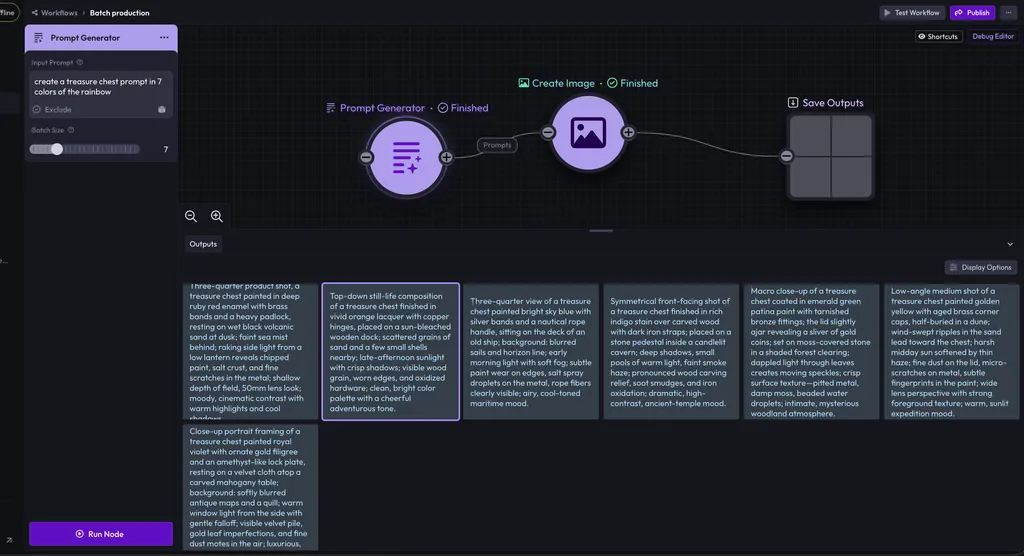
  • AI-powered prompt generation: You can now use the new Prompt Generator node in blueprints to create many prompts at once with a single instruction prompt so you save a ton of time generated relevant prompts with less manual iteration.

LTX Video 2.3, batch prompt generation, and live workflow tracking (3 of 3)

Bug fixes & improvements
  • Composition canvas fixes: Resolved issues with rectangle positioning, text overflow, and the canvas disappearing after a node runs.
  • Prompt image paste restored: Fixed an issue preventing images from being pasted into the prompt field.
  • Reduced stuck inference runs: Improved reliability of inference run completion, reducing instances that required manual intervention.
  • Crash fix on legacy nodes: Resolved a page crash that occurred when selecting older prompt edit nodes.
  • Incident banner readability: The incident banner now displays the actual incident title and is easier to read at a glance.

What's next?

  • Workspace creative unit transfers: You can now split and allocate creative units across workspaces, with support for auto-transfers from invoices and manual allocation management, making subscription management more flexible for larger teams.
  • Browse and inspect models via MCP – Agents can now search and filter available models by modality, type, and capabilities directly through MCP, making it easier to find the right model for your workflow.
New models3

Gemini Flash 3.1, Seedream, and public workflow sharing

What's new?

  • New AI models across image and video – You can now generate content using Seedream 5.0 Lite (up to 3K resolution), Nano Banana 2 powered by Gemini 3.1 Flash (1K/2K/4K image generation + editing with batch support), giving you more high-quality generation options across formats.

Gemini Flash 3.1, Seedream, and public workflow sharing (1 of 2)

  • Public workflow sharing – You can now share workflows publicly with a single click, so others can discover and duplicate them across workspaces without manual exporting or cloning.

Gemini Flash 3.1, Seedream, and public workflow sharing (2 of 2)

  • Refined image & video forms – Image refinement tools (Upscale, Remove Background, Vectorize, Reframe) and video refinement tools (Upscale, Reframe, Remove Background, Add SFX) have been migrated to a new data-driven system, making workflows more scalable and maintainable.
Bug fixes & improvements
  • Clearer GPT image errors – Large image uploads now show clear, actionable error messages instead of failing silently.
  • Workflow selection UI fixes – Improved workflow cards in selection dialogs to prevent layout and display issues.
  • Translate button fix – Resolved an issue preventing the translate button from working in prompt settings.
  • Improved system reliability – Increased service health check timing to prevent premature restarts and improved overall stability.
New models4

New image, video, and 3D models plus workflow improvements

New image, video, and 3D models plus workflow improvements

What's new?

  • Adjust similarity node in workflows – Fine-tune how closely outputs match reference images for better creative consistency without over-constraining results.
  • Improved inference forms in Forge – Run inference with smarter, state-aware forms to streamline complex workflows and reduce reconfiguration.
  • Workflows productivity shortcuts – Duplicate nodes using keyboard shortcuts: CMD+D (Mac) or CTRL+D (Windows) for faster workflow building.
  • Removed workflow details page – Workflow management has been streamlined by consolidating actions into the editor overview mode and updated workflow cards.
Bug fixes & improvements
  • Continuous improvements on the new unified export dialogue: Fixed export issues to ensure metadata is preserved, preferences are saved correctly, and exports behave reliably.
  • Fixed multiple issues affecting model training visibility, inference errors, and workflows stability.
  • Improved reliability across video models and inference workflows.

Improved Layer exports: PSDs, metadata, and resolutions

🚀 Export System Improvements (Baseline Release)

A new, unified export experience has been introduced across Layer, providing teams with enhanced control, consistency, and production-ready outputs.

🆕 New Export Dialog (Unified Component)

A standardized export dialog is now used across the platform.

  • Quality & Resolution Controls
    • Adjustable output quality
    • Resolution scaling options
    • Consistent behavior across image types
  • Admin-Controlled Metadata Toggle
    • Workspace-level setting
    • Admins can enable/disable embedded metadata controlling
    • Applies across all exports within the workspace
  • Save Export Preferences Locally
    • Remembers last-used export settings
    • Reduces repetitive configuration for high-volume workflows
  • Frontend Alignment
    • All existing download/export entry points now use this unified dialog
    • Consistent behavior across image generation, editing, and workflow outputs

🖼️ Expanded File Format Support

Generated assets can now be exported in:

  • PNG
  • JPEG
  • PSD (NEW)

Embedded Metadata Support

For supported formats, Layer now embeds:

  • Model used
  • Generation IDs
  • Timestamps
  • Other internal tracking data

This improves:

  • Traceability
  • Compliance workflows
  • Performance attribution
  • Asset lifecycle tracking

PSD Export

  • PSD exports include a single generated image as a layer
  • Compatible with Photoshop workflows
  • Designed for seamless handoff to creative teams

📦 Batch Export via ZIP

  • Export multiple assets at once
  • Automatically bundle them into a ZIP file
  • Maintain metadata and selected export settings across the batch

This significantly improves high-volume production workflows (UA, LiveOps, variants).

What's next?

The following enhancements are planned next:

  • Asynchronous Export Notifications — notify users when export processing is complete, especially relevant for large batch exports and Drive upload/download workflows.
  • Metadata Preservation Across Uploaded Files — preserve Layer metadata when uploading files into Layer, convert between formats (e.g., PNG → PSD), and ensure metadata continuity across the full asset lifecycle.
New models15
Grok Imagine VideoVideo
xAI

xAI's video generation model capable of creating high-quality 720p video from text and images.

Hunyuan 3D v3.1 Fast3D
Tencent

Fast Hunyuan 3D model for rapid 3D generation with PBR material support.

Hunyuan 3D v3.1 Pro3D
Tencent

Latest Hunyuan 3D model with enhanced quality, multi-view input, and PBR material support.

PixVerse v5.5Video
PixVerse

Latest PixVerse video model with enhanced quality and audio generation, supporting up to 1080p resolution.

PixVerse v5.5 FastVideo
PixVerse

Speed-optimized PixVerse v5.5 variant for rapid video generation at up to 720p resolution.

Seedance 1.5 ProVideo
ByteDance

Next-generation Seedance video model with improved quality, 1080p output, and integrated audio generation.

FLUX.2 [klein] 4B EditImage
Black Forest Labs
FLUX.2 [klein] 9B EditImage
Black Forest Labs
Kling Image O3Image
Kling

Kling Omni 3 image model. High-quality images with text rendering capabilities up to 4K resolution.

Kling Image V3Image
Kling

Kling V3 image model. High-quality images with negative prompts, supports up to 2K resolution.

Kling O3 ProVideo
Kling

Generate high-quality videos with prompts, images, or reference elements. Pro tier for premium quality.

Kling O3 StandardVideo
Kling

Generate videos with prompts, images, or reference elements. Standard tier for balanced quality and speed.

Kling V3 ProVideo
Kling

Generate high-quality videos with advanced control. Pro tier with negative prompts.

Kling V3 StandardVideo
Kling

Generate videos with prompts and images. Standard tier with negative prompts.

Qwen-Image Edit 2511Image
Qwen

Latest Qwen image editing model. Supports prompt-guided transformations with enhanced quality.

Workflows GA, featured templates, and model tagging

Happy January! With the new year comes the GA launch of a brand-new feature: Workflows.

Workflows allows you to automate both simple and complex tasks into just a handful of clicks, giving you the power to generate anywhere from a handful to hundreds of assets at once. Unlike other workflows tool you can parallelize all the runs and save hours of generation time when you're going for large tasks. Want to re-skin dozens of characters at once or an entire game library, or generate dozens of new video variants for your User Acquisition campaigns? Workflows lets you do it! Want to get the most out of Workflows? Check out our tutorial videos on YouTube and help center articles and get creating now.

Features

  • Workflows are now available to all users. Simply navigate to the Workflows option on the left nav bar, or pick Workflows from the home page.
  • Featured Workflow Templates are available! Featured Workflows have been created by the Layer team and are a great way to start exploring how Workflows can supercharge your UA and Live Ops campaigns or Game Art pipelines. Here are just a few of the things we've built for you:
    • Add an AI hook in front of your UA campaign videos, then automatically export the updated video.
    • Costume your characters in a few simple steps.
    • Use your character images to create TikTok dances, perfect for social sharing.
    • Generate CRM header images at all of your needed resolutions.
    • And much more!
  • New templates have arrived. A new Consistent Character Placement template has been added to help you place characters into a diverse range of scenes without sacrificing the character's style. The Style Transfer to Items and Scenes templates have been added as well, and these experimental templates allow you to try out one of the most commonly asked for tools: Taking a few images and applying their visual style to a different image.
  • New model organization and tagging is fully live — users can now filter, sort, and organize models in a much better way.
Bug fixes
  • Veo3.1 generations now starts without audio by default
  • Fixed an issue in date validation where expired grants were incorrectly considered active. Corrected unit rollover behavior caused by the reset logic, which was unintentionally allowing monthly units to remain available for two billing cycles. Ensured unit expiration now aligns correctly with the intended single billing cycle, preventing unintended rollovers.
  • Added support for 4 and 6 seconds on Veo models.
  • Fixed an issue in Gemini 3 Image Edit where the aspect ratio was not automatically set to the closest matching option when a base image was added to an inference form.
  • Fixed an issue where reforging an image edited with Gemini 3 Pro did not retain the original or reference image and reset the aspect ratio, preventing the reforge feature from working as intended.
  • Fixed an issue where using Remove Background or Vectorize on multiple images generated with the 2D Generator resulted in an error.
  • Fixed an issue in Canvas where selecting an area and attempting to Forge and Save the result caused an error, blocking users from completing edits.
  • Fixed an issue where the Analyze tab on model pages returned an internal server error due to a GraphQL-related failure.
New models8

Ready to scale your creative production?