

TL;DR: The Mesh Builder Agent is Layer's newest AI agent for 3D. It combines the latest Tripo and Meshy 3D models with GPT Astra and Claude Fable to turn a single concept art into 3D assets for in-engine prototyping. It handles hard surfaces, unified PBR materials, transparent materials like glass, and full characters split into named, separate parts such as weapons, accessories and clothing. You can keep editing the model in the same chat. It's in beta now: add "build it with the mesh builder" to your prompt at layer.ai.
We're excited to launch Layer's newest agent, the Mesh Builder! It joins the Playable Ads and Motion Designer agents, and it's built for one job: getting your characters, props and gear from concept art into 3D, ready for prototyping in your engine.
What is the Mesh Builder?
The Mesh Builder is a Layer agent that creates 3D assets for in-engine prototyping. It uses the latest Tripo and Meshy 3D models together with GPT Astra and Claude Fable.
Instead of turning your art into one solid lump, it looks at your character design or prop, pulls out the elements that make it up, and then rebuilds them in a multi-step process. That means you can create equipment, objects and clothing and socket them onto your characters, all from a single piece of concept art.
What the Mesh Builder can do
Full 3D characters, split into parts you can use
The Mesh Builder supports full 3D characters, including accessories and segmentation. It can generate weapons, accessories and clothing and place them on a character, and each piece comes out as its own part.
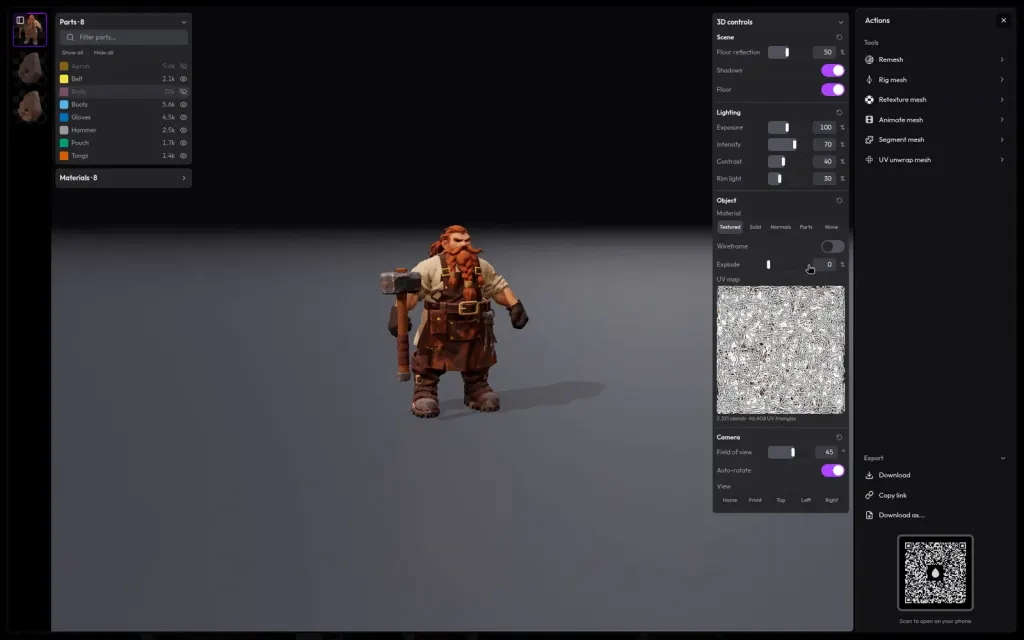
Our dwarf blacksmith came out as 8 separate parts with 8 materials: Apron, Belt, Body, Boots, Gloves, Hammer, Pouch and Tongs (46,408 faces, 12.5 MB glTF). Hide the apron and body and you can see every piece of gear on its own.
Human-readable part names
No more Mesh_001 to Mesh_047. The Mesh Builder names parts the way an artist would, so you know what you're looking at the moment you open the file. You can see it in every example here, from Hammer and Tongs to Cork_Stopper and Glass_Vial.
Unified PBR materials
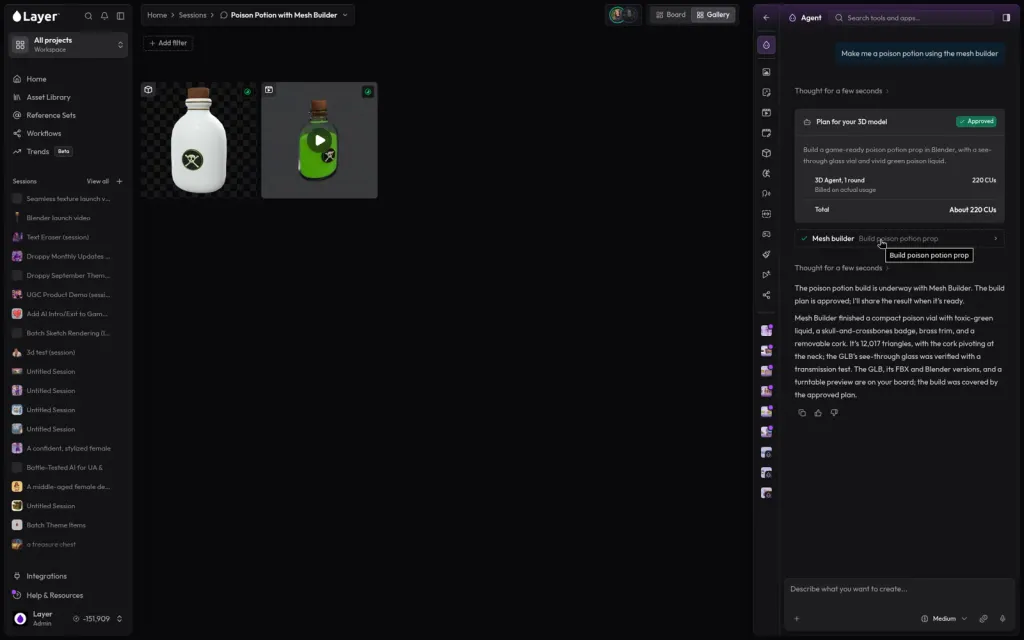
Objects come out with unified PBR materials, so they look right under your lighting. Our poison potion has separate materials for Cork, Glass, Antique_Brass and Toxic_Green_Poison, with base color, roughness and emissive settings you can check in the viewer.
Transparent materials like glass and windshields
The Mesh Builder can create objects with transparency, like glass or windshields. The potion's Glass_Vial holds a separate Poison_Liquid part, and the window below has its own glazing parts.
Clean hard-surface models
Props, buildings and vehicles need crisp edges. Our double-hung window came out as a light hard-surface model (10,152 faces, 319.9 KB) with Frame, Sash_Upper, Glazing_Lower and Glazing_Upper as separate parts.
Edit, iterate and update in the chat
Not quite right? Keep talking. You can edit, iterate on and update your model within the same chat session, without starting over.
Keep going with Layer's 3D and video tools
Every 3D asset in Layer comes with one-click mesh actions: Remesh, Rig mesh, Retexture mesh, Animate mesh, Segment mesh and UV unwrap mesh. The 3D viewer lets you check lighting, material views, an exploded view and the UV map. You can download your asset, pick another format with Download as, or scan the QR code to open it on your phone.
You can also turn your asset into a video preview and polish it with Layer's video tools, like upscale, reframe, extend, remove background, lip sync, subtitles and dub.
How the Mesh Builder works, step by step
- Start with your concept art. Bring a character design or prop into a chat on Layer.
- Ask for the Mesh Builder. Add "build it with the mesh builder" to your prompt.
- It breaks your design down. The agent pulls out the elements that make up your character or prop, like the body, clothing, weapons and accessories.
- It rebuilds each part in 3D. Using the latest Tripo and Meshy models plus GPT Astra and Claude Fable, it recreates each element in a multi-step process, with PBR materials, transparency where needed and human-readable part names.
- It puts your character together. Equipment, objects and clothing are placed on the character as separate parts.
- Iterate in the chat. Ask for changes and update the model in the same session.
- Take it further. Remesh, rig, retexture, animate, segment or UV unwrap, then download for prototyping in your engine.
Who the Mesh Builder is for
- Game artists and 3D artists who want to go from concept art to a segmented 3D model quickly.
- Game designers and prototypers who need characters, props and gear in-engine to test ideas.
- Teams building characters with lots of gear, where weapons, accessories and clothing need to be separate parts.
- Artists working in Blender and other tools, who can bring Layer assets into their pipeline. See our Blender integration.
How to try the Mesh Builder
Go to layer.ai, start a chat, and add "build it with the mesh builder" to your prompt. That's it. Working with an AI assistant? You can also connect it to Layer through the Layer MCP.
The Mesh Builder is in beta
The Mesh Builder is in beta, and we'll be updating it over the next few weeks based on your feedback. Please send us your results and feedback. We want to see what you build!
FAQ
What is Layer's Mesh Builder?
The Mesh Builder is a Layer AI agent that creates 3D assets from concept art for in-engine prototyping. It supports hard surfaces, PBR materials, transparent materials and full characters with accessories and segmentation.
Which AI models does the Mesh Builder use?
It combines the latest Tripo and Meshy 3D models with GPT Astra and Claude Fable.
Can the Mesh Builder make a 3D character from a single concept art?
Yes. It extracts the elements of your character design and rebuilds them in a multi-step process, so you can create and socket equipment, objects and clothing onto your character from one concept art.
Does the Mesh Builder support PBR and transparent materials?
Yes. It creates objects with unified PBR materials and can make transparent materials like glass or windshields.
Can I edit a 3D model after the Mesh Builder creates it?
Yes. You can edit, iterate on and update your model within the same chat session. You can also use Layer's mesh actions to remesh, rig, retexture, animate, segment or UV unwrap it.
How do I use the Mesh Builder?
Add "build it with the mesh builder" to your prompt on layer.ai. It's in beta, so we'd love to hear your feedback.
Ready to turn your concept art into 3D? Try the Mesh Builder today at layer.ai and show us what you make.
#TeamLayer