Skip to content
Layer

Godot AI Plugin

Generate sprites, tilesets and UI without leaving Godot

The current build is being published. Check back in a few minutes — installation takes under a minute once it is up.

2D3DScriptGameAsset Store
SceneImport
+Filter Nodes
VillageGroundActorsClericArcherBarbarianChickenApprenticePixelArtMarketStallWithARedAndWh1PixelArtMarketStallWithARedAndWh1EditImageGeneration20261114125538PixelArtDialogueBoxPanelFillingTheLine
FileSystemHistory
res://layer/d298ccb2-6cb3-4959-8296-6d97f09959f1
core_loopexplorationmain_menulayerd298ccb2-6cb3-4959-8296-6d97f09959f13d-generation-2026-11-10-222137.glbimage-generation-2026-11-14-125341.png
village×+
View
OutputDebuggerAudioAnimation4.7.stable
InspectorSignalsGroupsLayer
LayerGeneric Fantasy RPG
Search tools

Godot assets

Image to Sprite2D9-slice UI elementSprite sheet

Image

Create imageCreate PBR materialsCreate textureCreate skyboxCreate tileCreate GIFCreate SVGPrompt edit imageRemove image backgroundUpscale imageReframe imageChange camera angleSplit image into layersSplit image into parallax layersInpaint imageRelight imageRestyle imageVectorize imageRemove text from imageTranslate text in imageEdit text in imageErase object from imageChange expressionVirtual try-onPixelate imageDenoise imageRestore imageColorize imageSegment imageMask from prompt

Pick a tool.

LayerGeneric Fantasy RPG
Image to Sprite2D

Pixel art market stall with a striped awning

GPT Image 2.5 Flare (Recommended) · 1.7 CU / megapixel

Generate
Generating on Layer: Pixel art market stall with a striped awningStop waiting
Ready: Pixel art market stall with a striped awningPlace
LayerGeneric Fantasy RPG
Remove image background

Cut the subject out onto transparency.

Editing pixel-art-market-stall-with-a-red-and-wh-1.pngres://layer/d298ccb2-6cb3-4959-8296-6d97f09959f1

Ideogram Remove Background (Recommended) · 0.3 CU / generation

Remove image background: pixel-art-market-stall-with-a-red-and-wh-1.png
Generating on Layer: Remove image background: pixel-art-market-stall-with-a-red-and-wh-1.pngStop waiting
Ready: edit of pixel-art-market-stall-with-a-red-and-wh-1.png: Remove image backgroundPlace
LayerGeneric Fantasy RPG
Sprite sheet

Pixel art sprite sheet of a white farm chicken walking

GPT Image 2.5 Flare (Recommended) · 1.7 CU / megapixel

Generate
Generating on Layer: Pixel art sprite sheet of a white farm chicken walkingStop waiting
Ready: Pixel art sprite sheet of a white farm chicken walkingPlace
LayerGeneric Fantasy RPG
9-slice UI element

Pixel art dialogue box, dark wood border with brass corners

GPT Image 2.5 Flare (Recommended) · 1.7 CU / megapixel

Generate
Generating on Layer: Pixel art dialogue box, dark wood border with brass cornersStop waiting
Ready: Pixel art dialogue box, dark wood border with brass cornersPlace
LayerGeneric Fantasy RPG
pixel_art_dialogue_box_panel_filling_PlaceRebuild
pixel_art_sprite_sheet_of_a_white_farm_PlaceFrames
image-generation-2026-11-14Place
pixel_art_market_stall_with_a_red_and_PlaceFrames
make_it_autumn-2026-11-12-0248DownloadPlace
pixel_art_market_stall_with_a_red_and_PlaceFrames
image-generation-2026-11-14Place
pixel_art_sprite_sheet_of_a_white_farm_PlaceFrames
pixel_art_dialogue_box_panel_filling_PlaceRebuild
pixel_art_sprite_sheet_of_a_white_farm_PlaceFrames
image-generation-2026-11-14Place
pixel_art_market_stall_with_a_red_and_PlaceFrames
make_it_autumn-2026-11-12-0248DownloadPlace

Installed in under a minute

Runs in Godot on macOS, Windows or Linux.

  1. 1

    Download the addon

    One .zip for macOS, Windows and Linux, pure GDScript. It is free with any Layer plan, including the free one.

  2. 2

    Unzip it into your project

    Extract the zip into your Godot project's folder. It holds a single folder under addons/, so it lands next to your other plugins and touches nothing else. Commit it with the project and the rest of your team has it too.

  3. 3

    Open Godot and find Layer

    Open Project → Project Settings → Plugins, turn on Layer AI, open the Layer tab in the dock on the right, and sign in with your Layer account. Generate from the dock, and Place puts what Layer makes into the scene you have open as Godot nodes.

An AI asset generator inside the Godot editor

Godot is the open-source engine a large share of indie and jam teams ship 2D games with. Its scene system turns art into nodes in a few clicks, which means the slow part of a 2D project is rarely the engine: it is the art. Sprites, animation frames, tiles, buttons and panels all have to exist before a level feels like anything. Layer generates them, and the Layer AI plugin puts that generation inside the Godot editor, working on the scene you already have open.

The plugin is a dock in the editor. It holds your account, your workspace and the Layer session your project is bound to, the tools Layer offers for images, and the files the session holds. Everything it makes arrives as the node Godot expects: an image as a Sprite2D, a sprite sheet as an AnimatedSprite2D, a 9-slice element as a NinePatchRect, tiles as a TileSet painted into a TileMapLayer. Nothing is downloaded, sliced and imported by hand.

Every clip and screenshot on this page is the plugin at work in Generic Fantasy RPG, an internal pixel-art Godot 4.7 project of ours, with real Layer generations. For indie game developers working solo or in small teams, that is the point: production-ready 2D assets without leaving the project you are building.

AI sprite generator: images placed as Sprite2D

Image to Sprite2D generates an image from a description and places it as a Sprite2D at the center of the 2D view with one click. Placing is one undo step, so trying an asset in the scene costs nothing.

The model picker lists every model that can run the tool, with its price and Layer's recommendation first, and remembers your pick per workspace on this machine, never in the project. Every run is priced before it is sent.
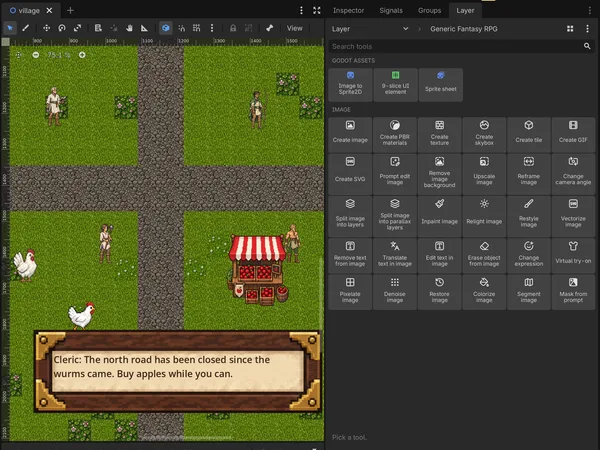
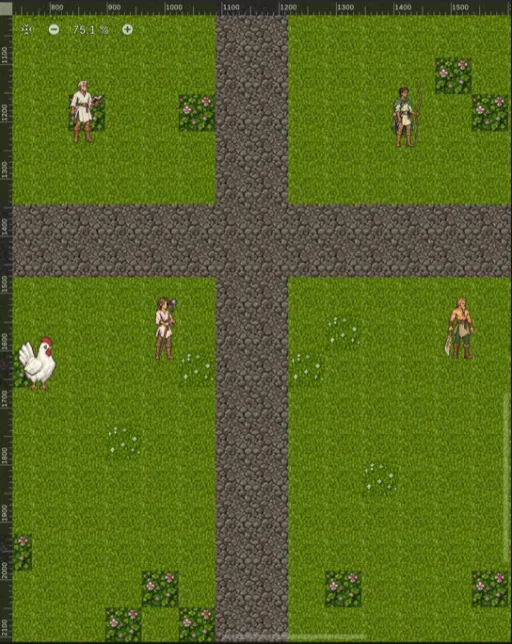
The Godot editor with the Layer dock open on the right, showing a pixel-art village scene with a generated market stall, two chickens and a 9-slice dialogue box placed into it

Edit sprites in place: remove backgrounds, upscale, pixelate

The dock's image tools work on what is already in the project. Select an image in the FileSystem dock, or a node that shows one, and pick an edit: prompt edit, upscale, remove background, reframe, relight, restyle, pixelate, inpaint with a mask and more. The original is never touched. The result is saved beside it as a new version of the original's name, and an edit of a node is placed over it as a copy showing the result, with the original hidden, in one undo step.

That makes background removal and quick variations part of the scene work. Generate a prop on a plain background, remove the background on the placed node, and the cutout takes its place at the same size.
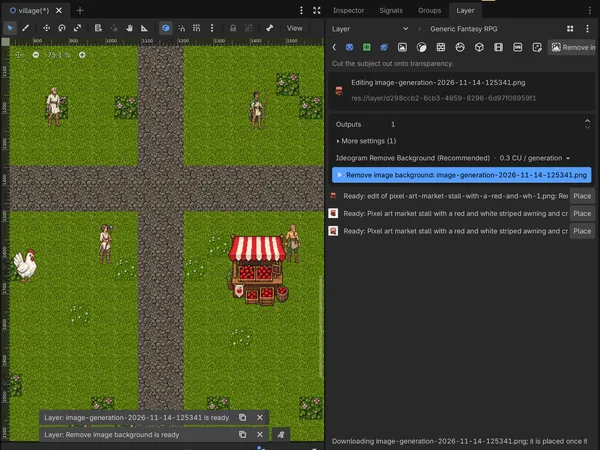
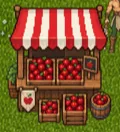
A market stall placed in the scene after Remove image background ran on it: the edited copy shows above the hidden original in the Scene tree, and the dock shows the edit's form and its price

Sprite sheets, tilesets and 9-slice UI as Godot nodes

Sprite sheets to AnimatedSprite2D

Sprite sheet generates the frames of an animation in a grid. Give the grid its columns and rows in the dock and the plugin builds a SpriteFrames beside the image; Place adds an AnimatedSprite2D playing it. A sheet the agent or the web app made with its frames and animations arrives ready to place. For more on making them, see sprite generation.

9-slice UI as NinePatchRect

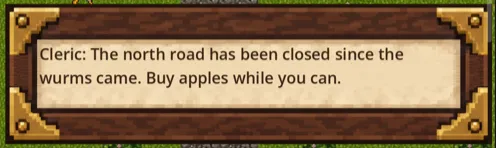
9-slice UI element generates a button, frame or panel that stretches. Layer finds its insets, the plugin builds a StyleBoxTexture from them, and Place adds a NinePatchRect with them as its patch margins, so a dialogue box or an inventory panel stretches to any size without smearing its corners. For whole menus and HUDs, see game UI kits.

AI tilesets for TileMapLayer

Game tiles made in Layer, by the agent or the web app, arrive with their grid. Each grid gets one TileSet, and Place paints a tile into the cell under the view center: into the selected TileMapLayer when it uses that grid, or into a new one with Y Sort on. For isometric and hex sets that snap together, see game tilesets.

Pixel art for 2D games

The village on this page is pixel art, and every asset in it was generated to match. Describe the style in the prompt and pick a model that draws it, or run Pixelate on any image in the project to turn it into pixel art beside the original. For palettes, eras and sprite-scale guidance, see pixel art.

Generated files in your Godot project and Git repository

Everything the plugin makes is filed under a Layer session, the same sessions you see at layer.ai, so work started in Godot can be reviewed in the browser and the other way round. The dock lists every file in the session, from Godot, the web app or a teammate, with a preview; previews stay in memory, and nothing lands in the project until you Download or Place it.
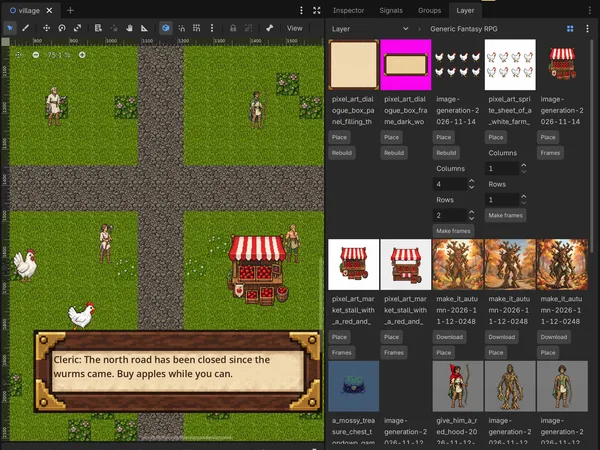
The Layer dock's session files view: generated sprites, sprite sheets and 9-slice panels with Place, Frames and Rebuild buttons, beside the pixel-art village scene

Files land in res://layer/ under the session, with a sidecar beside each image that records its metadata and never its prompt, and the TileSets, StyleBoxTextures and SpriteFrames built from them. Which session the project uses is a small file you commit, so a teammate who pulls works in the same one. Logins stay in Godot's per-user data folder, never in the project, and the plugin's JSON files are left out of exported games.

For studios that also build in Unity or Unreal Engine, or model in Blender, one Layer workspace, one catalog of models and one pool of Creative Units cover all of them. For batch pipelines, the Layer API runs the same generations headless.

Godot FAQ

Does Layer AI have a Godot plugin?+

Yes. Layer AI for Godot is an editor plugin for Godot 4.5 or later on macOS, Windows and Linux. Download the zip from this page, extract it into your project folder, turn on Layer AI under Project, Project Settings, Plugins, and sign in from the Layer dock. It is pure GDScript, with no GDExtension and no C#, so it runs on every platform the editor does.

Is there an AI sprite generator for Godot?+

Yes. The Layer AI plugin generates sprites from a description inside the Godot editor and places each one in your scene as a Sprite2D with one click. It also makes sprite sheets that play as an AnimatedSprite2D and 9-slice buttons and panels placed as a NinePatchRect, in pixel art or any other style, on the image model you pick from Layer AI's catalog.

Does the Godot plugin need an OpenAI API key?+

No. You sign in with your Layer AI account, or paste a Layer personal access token, and every model in Layer AI's catalog is available from the dock. There are no provider keys to manage, and generations use Creative Units the same way they do on the web.

Which Godot versions does the Layer AI plugin support?+

Godot 4.5 or later, on macOS, Windows and Linux. Godot 3 is not supported. The plugin is pure GDScript, with no GDExtension to compile, and the clip and screenshots on this page were captured in Godot 4.7.

Can AI generate a TileSet for Godot 4?+

Yes. Game tiles made in Layer AI, by the agent or the web app, arrive in Godot with their grid, and the plugin builds one TileSet resource per grid. Place paints a tile into the TileMapLayer you have selected, or into a new one with Y Sort on, so isometric and top-down tilesets go straight onto the map.

What can the Godot plugin make?+

Images placed as a Sprite2D, sprite sheets that become a SpriteFrames and an AnimatedSprite2D, and 9-slice buttons, frames and panels placed as a NinePatchRect with their margins found for you. Game tiles made in Layer arrive with their grid and become a TileSet you paint into a TileMapLayer. Layer's image tools run from the dock too, among them prompt edit, upscale, remove background, reframe, relight, restyle, pixelate and PBR materials, each on the model you pick from Layer's catalog.

How do edits work on images already in my project?+

Select an image in the FileSystem dock, or a Sprite2D, Sprite3D, TextureRect or TextureButton that shows one, and pick an edit. The original is never touched. The result is saved beside it with a versioned name, and an edit of a node is placed over it as a copy showing the result, with the original hidden. Each placement is one undo step.

Where do generated files go?+

Into res://layer/ inside your project, filed under the Layer session the project is bound to, with a small sidecar beside each image that records its tile, 9-slice or sprite sheet metadata. Commit them and your teammates work in the same session. Nothing lands in the project until you click Download or Place, unless you turn on automatic downloads.

How much does the Godot plugin cost?+

The plugin is free with any Layer plan, including the free one. Generations use Creative Units the same way they do on the web. Every run is priced before it is sent, and a run above the per-run limit you set in Editor Settings is not sent.

Bring Layer into Godot

Bring Layer's models into your Godot scenes.