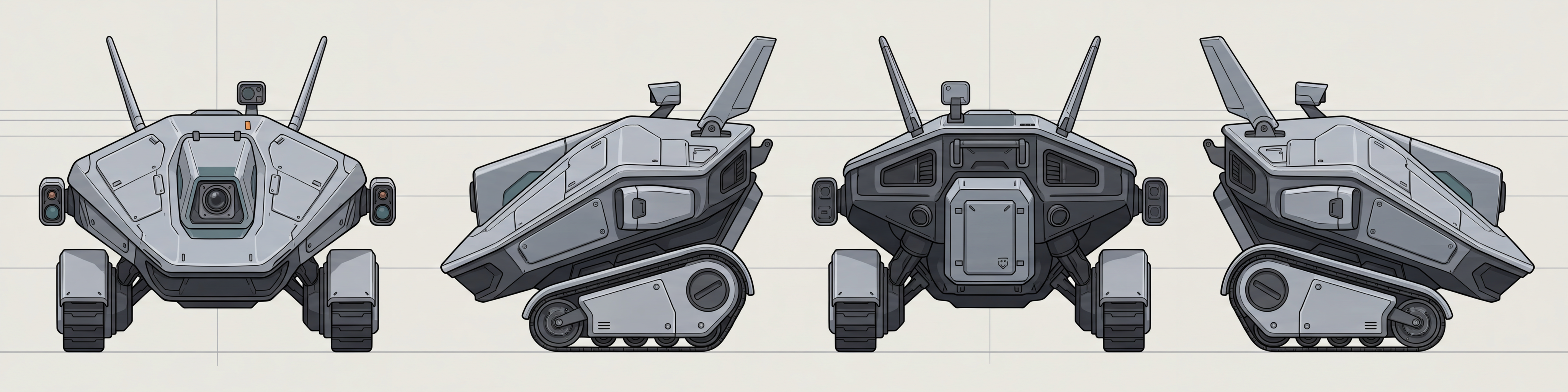
A model built from a single image gets the front right and makes up the back. For a robot with a sensor pack or a character with a quiver, that invented back is the part your modeler ends up redoing.
Write what the thing is, the way you would brief a concept artist. Layer draws the front, left, back and right, checks that the four agree, and builds the model from all of them with Tripo 3.1. You never crop a sheet into views or sort out which image is which side.
Four Drawings Before Any Geometry
The turnaround decides the model, so Layer draws it on shared guides: the shoulder line, the deck height and the top of the head sit at the same place in every view. It then gives the model each view as its own image, labeled with the side it shows.
What Makes a Turnaround Buildable
Views that agree When one view has wheels and another has treads, Layer asks which to keep and redraws before building.
Detail on the back, drawn rather than guessed A pack, a tail or a vent on the back comes from the back view.
A neutral pose for characters Keep arms clear of the body, since an action pose bakes into the mesh and sleeves fuse to whatever they touch.
After the Build
Download GLB, OBJ or FBX for Unity, Unreal, Godot or Blender. See image to 3D for the models behind it. To change a detail, edit the views and rebuild from the corrected sheet, so the drawing and the model stay in step.
To add a skeleton, see rigging 3D models. For full material sets, see PBR 3D models.